
Time Tracking for Construction Companies: Stop Losing Money on Hours You Can’t See
On most construction jobs, labor is the biggest cost — and the least visible one. Your crew starts at 7, but the timesheet says 7:15. Someone forgets a lunch break, someone else’s hours get rounded up, and by Friday the foreman is reconstructing the whole week from memory on a smudged paper sheet. Then the office retypes it into payroll on Monday, and nobody can say for sure what any single job actually cost in labor.
Fifteen minutes a day doesn’t sound like much. Across a ten-person crew, it’s twelve and a half hours a week — paid, unbilled, and invisible. Multiply that by fifty weeks and you’re looking at hundreds of hours a year leaking out of your jobs.
Time tracking for construction companies isn’t about watching your crew. It’s about knowing, to the hour and the dollar, what your jobs cost — while there’s still time to do something about it.
Why paper timesheets fail on the job site
Paper was never built for construction. Timesheets get filled in from memory at the end of the day, or the end of the week, when nobody remembers exactly when they arrived or left. Start times get rounded. One worker signs in for another. Sheets get rained on, lost in the truck, or handed in late — and then someone in the office has to decipher handwriting and retype everything into payroll, adding a second chance for errors.
Worst of all, paper keeps hours and job costs in separate worlds. By the time the hours reach the office, the job is already done. If a project burned twenty extra labor hours, you find out weeks later, when there’s nothing left to fix.
What good time tracking looks like on a construction crew
Good time tracking starts where the work happens: on the worker’s phone, at the job site. With the Manage4US Track4US app, each crew member punches in and out from their own phone — no paper, no shared tablet at the trailer, no end-of-week guessing.
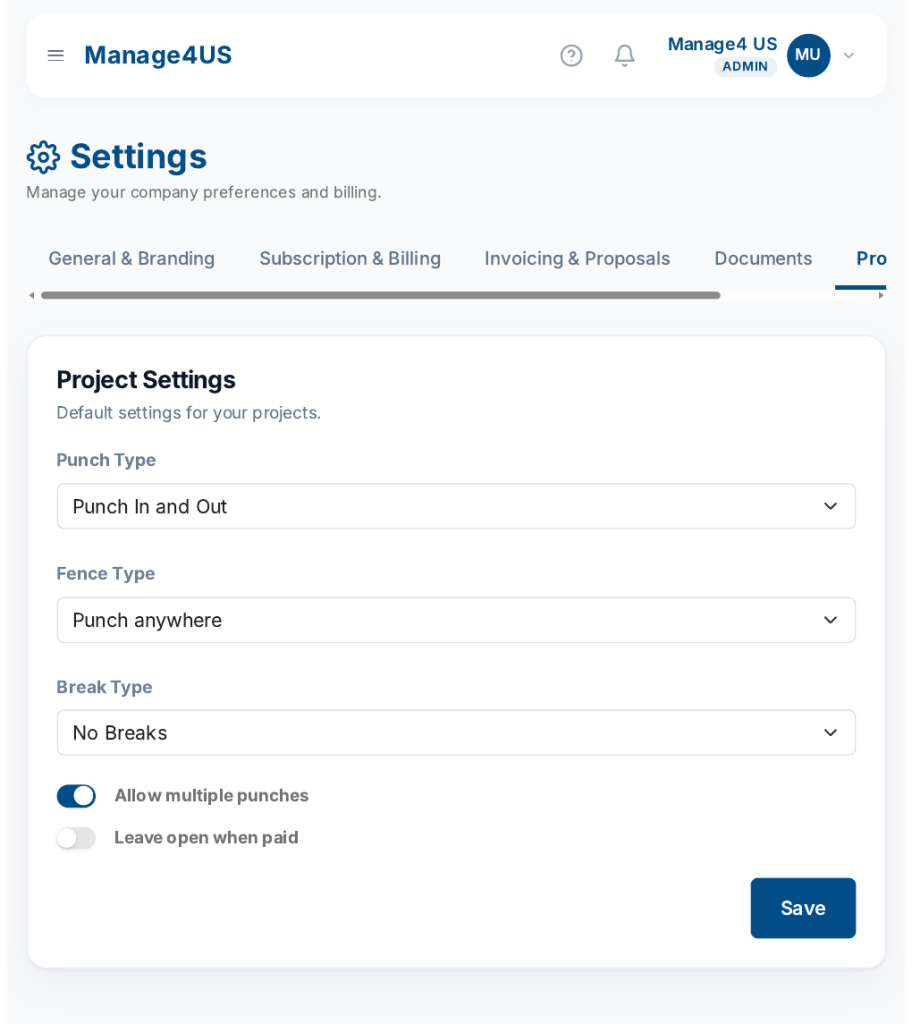
And it bends to the way your company actually works. In Manage4US you set the punch rules once, in Settings, and they apply to the whole crew:
- Punch type: punch in and out, punch out only, or total hours only.
- Geofencing: let the crew punch from anywhere, or require punches to happen inside a radius around the job site — for punch in only, punch out only, or both.
- Breaks: no breaks, unpaid breaks, paid break time up to a maximum, or a fixed paid or unpaid break.
- Multiple punches: allow more than one punch per day, so split shifts and moving between job sites are recorded correctly.
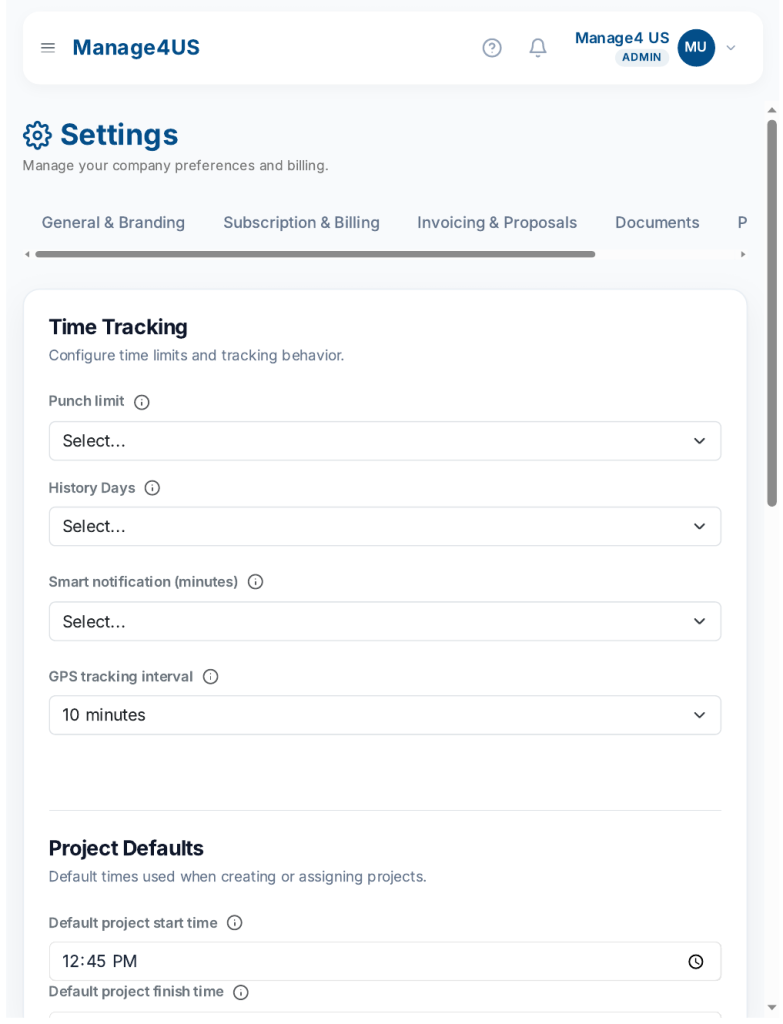
Behind the scenes, the app keeps the records honest without anyone having to police them. GPS tracking runs on a schedule you choose, smart notifications flag a missed punch after 15, 30 or 60 minutes, and same-day punch rules stop yesterday’s forgotten punch-out from corrupting today’s timesheet. SMS reminders nudge the crew on the day, so small gaps get fixed the same day — not at payroll time.
From punches to payroll in minutes
Recorded hours are only useful if you can review them fast. The Time Report in Manage4US shows every punch by employee or by project, with filters for All, Missing and Complete records and quick date ranges — yesterday, last 7 days, last 14 days, this month. Missing punches surface before payroll, not after it.
The View Stats button opens the Labor Analytics overview: labor cost, payable hours, punches complete percentage, and open punches — plus charts for payable hours by day, punch completeness by day, top employees, labor as a percentage of project value, and timesheet health per employee. It’s the difference between hoping the hours are right and seeing it.
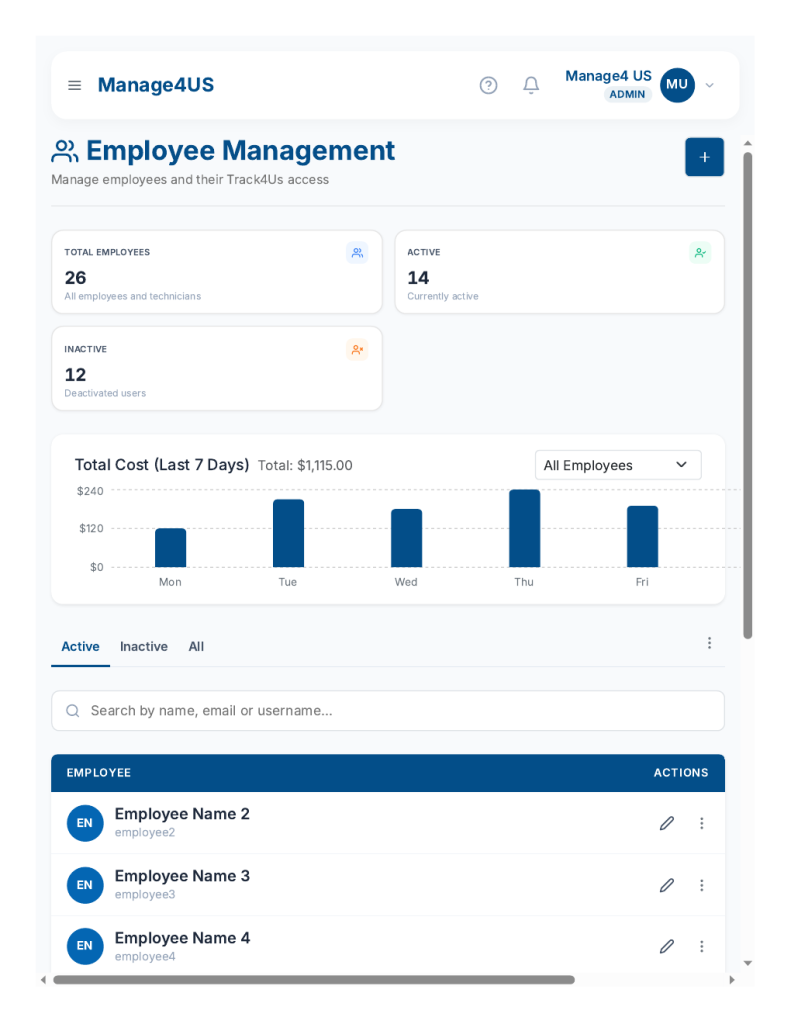
Each employee also carries their own hourly rate — and a weekend rate — in the system. Hours times rate is labor cost, calculated automatically instead of in a spreadsheet. The Employee Management screen shows the crew’s total labor cost for the last 7 days at a glance, day by day.
From hours to profit: know what each job really cost
This is where time tracking pays for itself. Because hours are tied to projects from the moment they’re punched, labor cost flows straight into each project’s Cost Viewer: total cost next to project value, with the estimated profit right there — plus the labor detail underneath, hours and rate per worker. A job that looked fine on the estimate can show its real margin while the crew is still on site.
The dashboard keeps the same picture at company level. The Labor card shows what the crew cost over the last 7 days, next to what’s still to collect, open work, and the proposal pipeline — cash, work, and what needs attention on one screen.
Setting it up in Manage4US
Getting a crew onto digital time tracking takes an afternoon, not a project:
- Add your employees with their hourly and weekend rates. Each one gets a Track4US login for the mobile app.
- Set your punch rules in Settings → Projects: punch type, geofence, breaks, and multiple punches.
- Set up the mobile side in Settings → Track4Us: GPS interval, smart notifications, and SMS reminders.
- Schedule the crew on the Schedule screen, by project, so everyone knows where to be.
- Review the Time Report weekly — check the Missing filter before payroll, and glance at Labor Analytics to see which jobs are eating hours.
That’s it. No hardware to buy, no paper to chase, no Friday-afternoon reconstruction.
Stop paying for hours you can’t see
Every untracked hour is money your company already spent — it just never shows up on any report. Mobile punch in/out with geofencing, honest break rules, and labor reports that tie hours to each job’s profit turn your biggest cost into something you can actually manage.
Try Manage4US free for 14 days and see what your crew’s hours really look like — no contract, no credit card to start.