
Project Profitability for Small Contractors: Know What Each Job Really Makes
You priced the job at $73,800. The crew worked on it for months. The customer paid in installments. And when someone finally asks, “Did we make money on that one?” — nobody knows. Not really. The estimate lives in one place, the hours are on paper timesheets, the material receipts are in a drawer, and the invoices live in another system. Most small contractors find out whether a job was profitable months after it ended — usually when the accountant says so.
That is the most expensive blind spot in a small construction business. On a fixed-price job, every hour your crew works comes straight out of your margin. Knowing what each job really costs — while the crew is still on site — is the difference between running a business and hoping for the best.
Why small contractors lose track of profit
It is four small gaps that add up.
First, the estimate and the actuals live apart. The proposal says what the job should cost. What it did cost is scattered across timesheets, receipts, and supplier invoices — and nobody reconciles the two until the job is over.
Second, labor hours arrive late and incomplete. Hours get written down from memory at the end of the day, or the end of the week. A missed punch here, a rounded start time there, and the labor cost is understated before anyone looks.
Third, expenses leak. A supply-house run, a small tool, a delivery fee — each one is easy to forget, and across a job they add up to real money never charged against the project.
Fourth, profit gets confused with cash. A customer who has paid $30,000 so far on a $73,800 contract can feel like a healthy job — even while the work already done cost more than that. Money in the bank is not money earned.
What the Cost Viewer shows
Manage4US closes those gaps with the Cost Viewer: one screen per project where the contract value sits next to everything the job has actually cost. It is the profit-visibility half of the system — the same place where tracked hours land as labor cost.
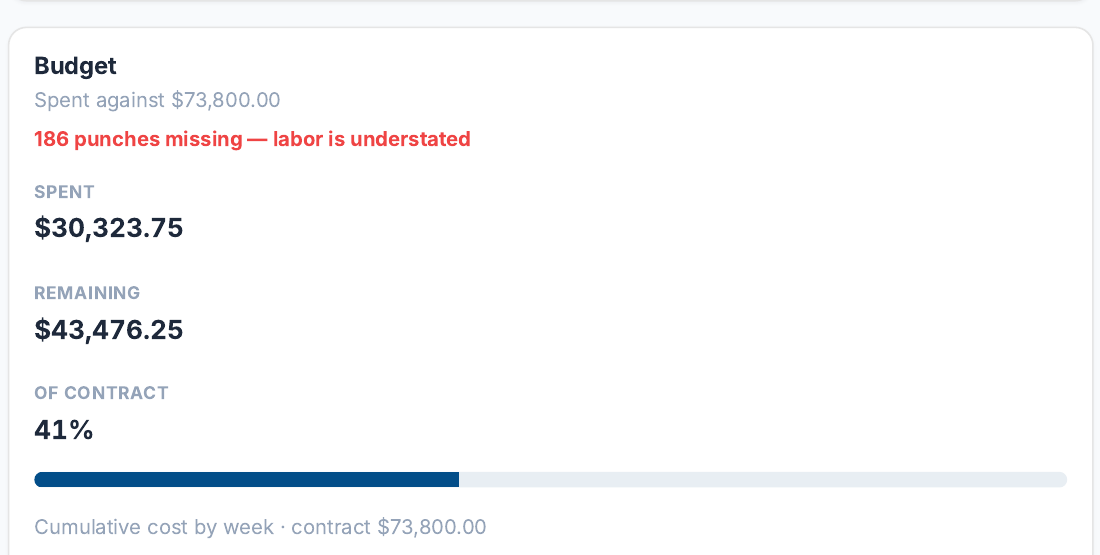
Take one project tracked in the system as an example. The contract is worth $73,800. So far the job has spent $30,323.75 — 41% of the contract value — leaving $43,476.25 still ahead. Below that headline, the cost breaks down into its parts: labor $30,323.75, subcontractor $0.00, expenses $0.00.
The labor detail is where the hours become dollars. This project has 1,417.05 hours recorded across the crew, at rates from $15.00 to $35.00 an hour depending on the worker — an average of about $21.40 an hour. Every punch on this job flows into that number, so the labor cost is not an estimate — it is actual hours times actual rates.
That is the number most small contractors never see until it is too late: not the price they quoted, but what the job has already consumed — while there is still time to act.
Your profit number is only as good as your time records
There is one warning on that same Cost Viewer screen, and it matters more than the numbers above it: “186 punches missing — labor is understated.” Of the project’s punches, 145 are complete and 186 are missing. Every missing punch is hours that were worked but never recorded — which means the $30,323.75 labor cost is a floor, not the full figure, and the $43,476.25 still ahead is optimistic.
This is why profit tracking and time tracking are the same problem. A Cost Viewer fed by paper timesheets will always flatter you: the hours nobody wrote down never show up as cost. The fix is not a better spreadsheet. It is complete punches — crew members clocking in and out from their phones on the job site, with the rules set once in Settings: punch in and out, geofencing that requires punches inside a radius around the site, break rules, and multiple punches per day for split shifts or moving between jobs. Smart notifications flag a missed punch after 15, 30 or 60 minutes, so gaps get fixed the same day instead of at payroll time.
Check the Time Report’s Missing filter before payroll, fix the gaps, and the profit figure you see is one you can trust.
From one job’s profit to better pricing
Once every job carries its own real cost, the decisions get easier.
You can see which types of jobs make money and which only look busy. A kitchen remodel ending 10% ahead and a deck job ending 5% behind are not the same business, even if both paid on time — and you only learn that by comparing their Cost Viewers, not their invoices.
You can see which crews are efficient. The same hours at different rates and different speeds produce very different margins, and the labor detail shows you exactly where the hours went.
And you can stop underbidding. When the next estimate is built on what similar jobs actually cost — real hours, real rates, real expenses — instead of what you hope they will cost, the price you quote is a price you can defend.
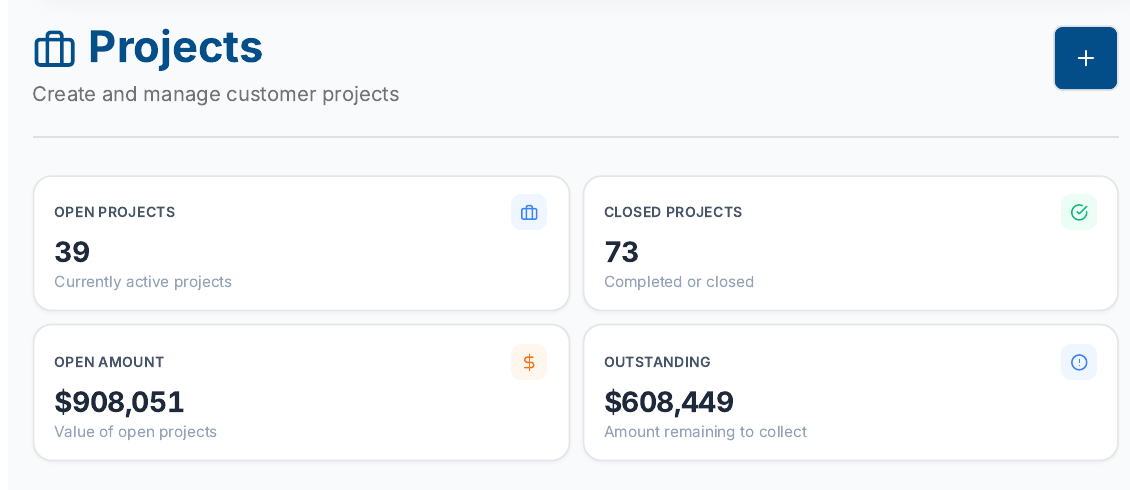
The Projects screen keeps the same picture at company level: 39 open projects worth $908,051, with $608,449 still outstanding to collect, and 73 closed projects behind them. That is your whole book of work on one screen — how much is out there, and how much of it is still yours to collect.
Setting it up in Manage4US
Seeing profit per project takes an afternoon to set up, not a new department:
- Create the project with its items from your Services catalog, so the contract value is in the system from day one.
- Add your employees with their hourly and weekend rates, and give each one a Track4US login for the mobile app.
- Schedule the crew on the Schedule screen, by project, so everyone knows where to be.
- Record expenses against the project as they happen — Quick Scan or manual entry — so nothing leaks.
- Review the Cost Viewer weekly and check the Time Report’s Missing filter before payroll, so the profit you see is built on complete hours.
No hardware to buy, no spreadsheet to maintain. The numbers build themselves out of the work your crew is already doing.
Stop guessing whether your jobs make money
An estimate tells you what a job should earn. Only the real cost tells you what it did earn — and that knowledge only helps while the job is still running. Put the contract next to the hours, the expenses and the subcontractors on one screen, keep the punches complete, and every job starts telling you the truth about itself.
Try Manage4US free for 14 days and see what your projects really make — no contract, no credit card to start.